
The Problem: Executive Reports Create Information Overload
Most project status reports fail because they try to satisfy every audience at once. They include project team updates, task-level notes, risk details, issue lists, budget commentary, dependency tracking, accomplishments, next steps, and sometimes several versions of the same message in different formats.
That creates a report that looks complete but is difficult to use. Executives are forced to search for the signal. They have to determine whether a red item is truly urgent, whether a delay affects a major commitment, whether a budget variance requires action, or whether a risk is simply being monitored by the team.
The result is predictable: the meeting becomes a clarification session instead of a decision session. Stakeholders ask what the report means. The project manager explains context verbally. The conversation expands instead of narrowing toward decisions, escalations, and next steps.
The Root Cause: Reports Are Written for the Team, Not for Executives
A project team needs detail. A project manager needs the schedule, backlog, dependencies, open actions, issue log, risk register, budget tracker, meeting notes, and decision history. That level of information is necessary to manage the work.
Executive communication operates at a different level of information than project team communication. Executives are not looking for a detailed replay of tasks, meetings, or day-to-day activity. They need to understand how a project or initiative affects the broader business, division, customer commitment, budget, timeline, risk exposure, or strategic objective. This is where many project managers and consultants miss the mark: they prepare status updates for the wrong audience. A report that may be useful for a project manager, scrum team, or delivery lead can create information overload for executives if it is not translated into business impact, decision points, and clear priorities. Executive updates should connect project status to the bigger picture so leaders can quickly see what matters, where attention is needed, and what decisions may affect overall project success.
This is the key distinction: operational detail explains how the work is being managed; executive reporting explains whether the project is likely to succeed. A useful executive project status report must translate project activity into leadership meaning.
What Executives Expect on One Page
Executives do not need every project detail on one page. They need the right details on one page. A strong executive project status report should make the most important information visible without forcing leaders to decode the project.
That is why the best executive updates are concise but not shallow. They reduce noise while preserving the information that affects decisions.
Where to Start: The Executive Summary
The executive summary should be the first section because it frames the entire report. It tells leaders how to interpret the update before they inspect the details.
A weak executive summary lists activity: meetings held, tasks completed, documents reviewed, or team discussions finished. A strong executive summary explains the project position in business terms. It answers: are we on track, what changed, why does it matter, and what action may be needed?
This section is important because executives often decide how deeply to read the report based on the summary. If the summary is vague, the conversation starts with clarification. If the summary is precise, the conversation can start with decisions.
Major Accomplishments: Show Progress That Matters
Major accomplishments should not be a running list of everything the team completed. They should highlight progress that changes the project position or increases confidence in delivery.
Executives care about accomplishments because they show whether the project is producing meaningful forward movement. However, an accomplishment only belongs in the executive report if it connects to a larger project outcome: completed scope, reduced risk, improved readiness, confirmed stakeholder alignment, achieved milestone, or removed blocker.
The best accomplishment statements explain both what was completed and why it matters. That turns activity into evidence of progress.
Goals: Clarify What the Team Is Driving Toward
Goals explain what the team is focused on next. This section should identify near-term objectives that matter to the project outcome, not every task planned for the next reporting period.
Goals are important for executive decisions because they show whether the team is focused on the right priorities. If goals are unclear, executives cannot easily judge whether the project is moving toward the right milestone, business value, readiness gate, or approval point.
A good goals section creates alignment. It tells leadership what success looks like before the next update and gives stakeholders a way to evaluate whether progress is meaningful.
KPIs With RAG: Make Project Health Visible Fast
KPIs help executives assess project health quickly. RAG indicators — red, amber, and green — make the report easier to scan, but they only work when the meaning behind the color is clear.
A common reporting failure is to show a yellow or red status without explaining the reason, the trend, the impact, or the recovery action. That forces leaders to ask basic questions before they can make decisions.
Good executive KPIs should connect directly to project success: schedule, budget, scope, quality, risks, issues, dependencies, stakeholder readiness, and delivery confidence. The RAG view should not be decorative. It should tell leadership where attention is required.
Top Issues: Show What Is Already Affecting Delivery
Issues are active problems already affecting the project. They are different from risks because they are no longer hypothetical. An issue may involve a missed dependency, delayed approval, staffing gap, unresolved requirement, budget constraint, vendor delay, or decision that is blocking progress.
Executives need to see top issues because many issues require authority, prioritization, funding, tradeoff decisions, or cross-functional alignment. The executive report should not list every open issue. It should surface the few issues that affect delivery confidence or business outcomes.
This section helps prevent leadership meetings from becoming discovery sessions. If the issue is clearly described, the discussion can move directly to ownership, decision, escalation, or recovery plan.
Key Risks: Show What Could Threaten Success Next
Risks help executives look forward. While issues describe problems that are already happening, risks describe conditions that could affect the project if they are not managed.
A strong risk section does more than list risk titles. It explains exposure, likely impact, mitigation, ownership, and whether the risk requires executive monitoring or action. That helps leadership understand which future problems could affect the project before they become active issues.
For executive reporting, the most useful risks are connected to project outcomes: schedule delay, cost pressure, scope instability, resource constraints, quality concerns, dependency failure, stakeholder readiness, vendor performance, or customer impact.
Timeline: Connect Status to Delivery Confidence
The timeline section shows whether the project is moving toward key milestones and delivery commitments. Executives do not need every task date. They need to know whether major phases, decision gates, dependencies, and milestone commitments are still credible.
A useful executive timeline highlights the critical path at a leadership level. It shows where the project has been, what is happening now, what comes next, and where schedule pressure may affect delivery confidence.
The timeline also connects the other sections. If a top issue affects a milestone, the timeline should make that visible. If a risk could delay a future phase, the timeline should help executives understand when that risk matters.
Summary: Turn the Update Into a Leadership Storyline
When these sections work together, the executive project status report becomes a storyline instead of a collection of fields. The executive summary frames the current position. Major accomplishments prove meaningful progress. Goals explain where the team is going next. KPIs and RAG indicators show health and trend. Top issues and risks explain what could affect success. The timeline connects everything to delivery confidence.
This structure matters because executive stakeholders do not read project reports like project teams do. They scan for the big picture. They want to know whether the project is healthy, whether success is still likely, what has changed, what needs attention, and what decision they may need to make.
A strong report therefore does not try to show everything. It organizes the few details that matter most into a clear executive narrative: current status, progress, priorities, health, threats, and delivery path.
Why the Tuplebits Executive Status Report Template Solves This Problem
The Tuplebits Executive Project Status Report Template is designed specifically to solve the problem of overloaded executive reporting. It does not try to compress a full project plan, RAID log, schedule, and meeting summary onto one page. Instead, it uses a simple six-section structure focused on information that directly affects executive decisions and overall project success.
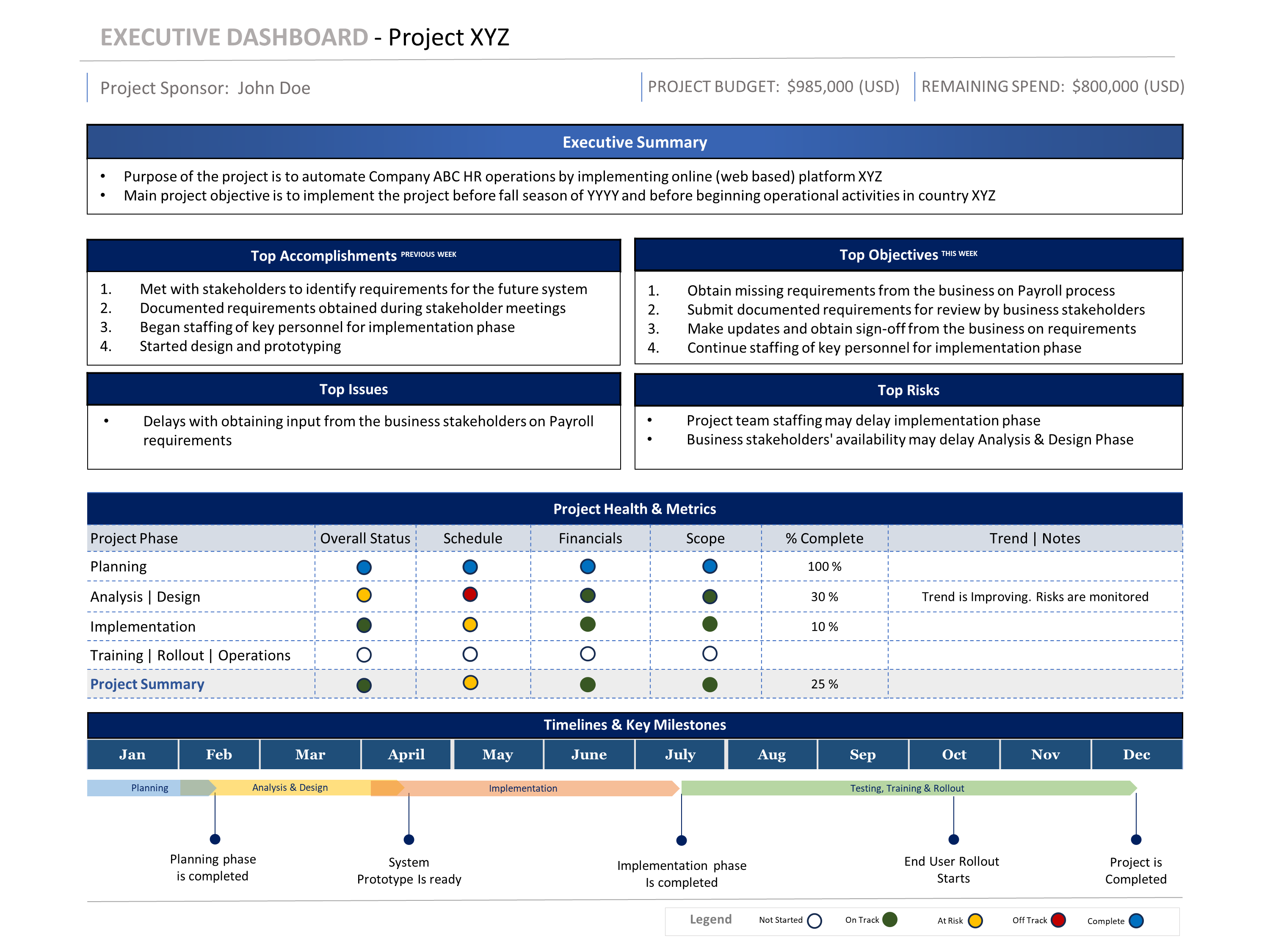
Example: Tuplebits one-page executive project status report structure with executive summary, major accomplishments, goals, KPIs with RAG, top issues and risks, and timeline.
The template puts the executive update into a concise structure: executive summary, major accomplishments, goals, KPIs with RAG, top issues and risks, and timeline. These sections match the executive lens because they focus on project health, progress, priorities, delivery confidence, and areas requiring attention.
That is different from a report with dozens of fields, multiple competing color systems, and long bullet lists outlining task-level information. Those details may be important for the project manager or team, but they are not always mapped directly to the big picture. The Tuplebits structure keeps the update focused on what executives need to understand, discuss, and decide.
Related Templates
If you need one focused executive update, start with the Executive Project Status Report Template. If you need a broader reporting package, use the Executive PM Reporting Toolkit, which includes status reports, Agile dashboards, roadmaps, budget views, org charts, meeting reports, and executive reporting guidance.
Need a Status Report Leaders Can Read Quickly?
Download a structured, executive-ready one-page status report template built for project reviews, steering committees, and leadership updates.
View Executive Status Report Template