“Perfect roadmap format for leadership. It made priorities, milestones, and dependencies clear in one view.”

Program Roadmap & Timelines Template
Build clear, executive-ready project roadmaps, timelines, and Gantt charts in minutes — without cluttered slides or complex tools. Designed for project managers, PMO teams, consultants, and IT leaders who need structured, decision-ready visibility across multiple projects, programs, and portfolios.
This one-page program roadmap template helps leaders communicate phases, milestones, dependencies, and timing across 1-, 3-, and 5-year planning horizons. It is designed for executive roadmap reviews, portfolio planning, funding discussions, and cross-team alignment — without rebuilding slides each cycle.
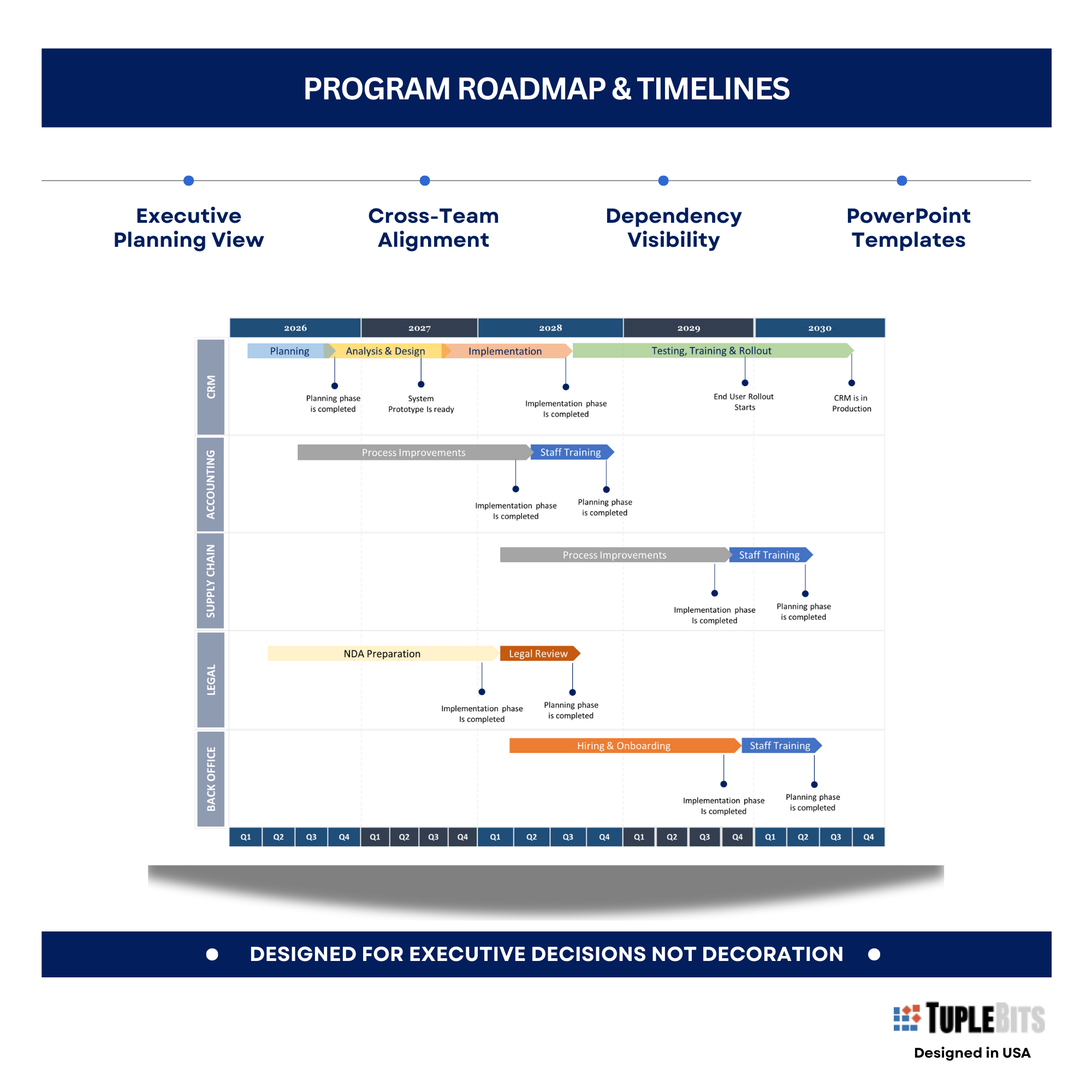
One Page. Big Picture. Better Decisions
Executive timeline chart for communicating milestones, dependencies, and phases at 1‑, 3‑, and 5‑year horizons.
Sale (regular )
This template is also included in the Executive PM Reporting Toolkit — a complete bundle with status reports, Agile dashboards, roadmaps, org charts, budget views, and executive reporting guidance.
Key Features
- Clean swimlane layout - easy to present
- Predefined Multi‑horizon roadmap (1/3/5 years) layouts
- Milestones, phases, and dependency lanes
- High‑contrast, board‑ready visuals
- Editable color themes for portfolio views
- Standard + widescreen templates
Why it works?
- This Program Milestone Roadmap & Timeline PowerPoint template makes long-horizon planning easy to present and maintain—no advanced skills required. Using standard PowerPoint or Google Slides tools, you can tailor colors, styles, and content to support portfolio-level roadmap planning.
- Pre-built examples show how milestones, phases, and dependencies align across 1-, 3-, and 5-year views, helping leadership grasp the plan at a glance. The clean, modern layout is board-ready, keeping focus on milestones, risks, and upcoming decisions.
Use Cases
Designed to support executive decision-making — not document activity.
- Program & portfolio planning — visualizing multi-year initiatives
- Executive roadmap reviews — milestones, phases, and dependencies
- Funding & prioritization discussions — 1-, 3-, and 5-year horizons
- Cross-team alignment — sequencing workstreams and delivery phases
Trusted by Project Managers & Consultants
Immediate Impact
Designed for leadership attention spans: signal first, detail second.
- Faster executive scan — phases, milestones, and dependencies in one view
- Less rework — reusable roadmap layouts across planning cycles
- Cleaner prioritization — makes sequencing and tradeoffs explicit
- Better alignment — reduces ambiguity across workstreams
Board-Ready Roadmap in 60 Seconds
A high-impact executive timeline for communicating milestones, dependencies, and phases across long horizons on a single slide
- Program direction — where the initiative is going
- Timing clarity — 1-, 3-, and 5-year horizons
- Milestone visibility — key outcomes and checkpoints
- Dependency awareness — what must happen first
- Funding and prioritization context — what matters most now
- Fewer follow-up questions — the plan reads itself
What’s Included
- PPTX roadmap templates for PowerPoint (also importable to Google Slides)
- Standard screen (4:3) package (widescreen 16:9 package available separately)
- Executive roadmap guidance embedded inside the PowerPoint (Guidelines & FAQs)
- Quick Start Guide (PDF)
- Example roadmaps included for multiple planning horizons and program structures
- Frequently asked questions (FAQ) section included
- Clean, presentation‑grade visual system
Used When
- Planning or reviewing program timelines beyond a single quarter
- Communicating long-term milestones to executives or boards
- Aligning dependencies across initiatives or workstreams
- Preparing strategic roadmaps for annual or multi-year planning
FAQ
How will I receive the files?
After checkout, you’ll receive a confirmation email with an instant download link to the ZIP package containing the templates and supplemental materials.
Can I customize colors, fonts, and sections?
Yes — everything is editable without a need to use advanced PowerPoint features or capabilities. You can also contact us for a custom version.
Can I use these templates for client or internal work?
Yes. Tuplebits templates can be used for internal business use and client-facing deliverables. Redistribution or resale of the templates themselves is not permitted.
Need a custom version?
Email info@tuplebits.com with your request and timeline.
What is legal terms of service for digital templates?
These Terms of Service ("Terms") govern your access to and use of digital products offered by Tuplebits LLC ("Tuplebits," "we," "us," or "our"), including project management templates, toolkits, and related digital assets (collectively, the "Products"). By purchasing, downloading, or using any Product, you agree to be bound by these Terms. Read Terms of Services
Why don’t these templates include artwork or business stock images?
Our templates are intentionally designed to support executive decisions, not decoration or visual excitement. Artwork, stock photos, and unrelated business imagery often distract stakeholders from the information that actually matters. By keeping visuals clean and focused, executives can scan roadmaps, dependencies, and tradeoffs faster and align more effectively.
Built for executive planning reviews. Explore the PM Toolkit, Executive Status Report, and Agile Executive Status Report for a complete reporting system.