Business & Project Management Templates

Risk Register Dashboard Template

★★★★★ 5-Star Rated Templates & Star Seller on Etsy — Trusted by project managers, PMOs, consultants, and delivery teams. Available for direct download. See Etsy reviews

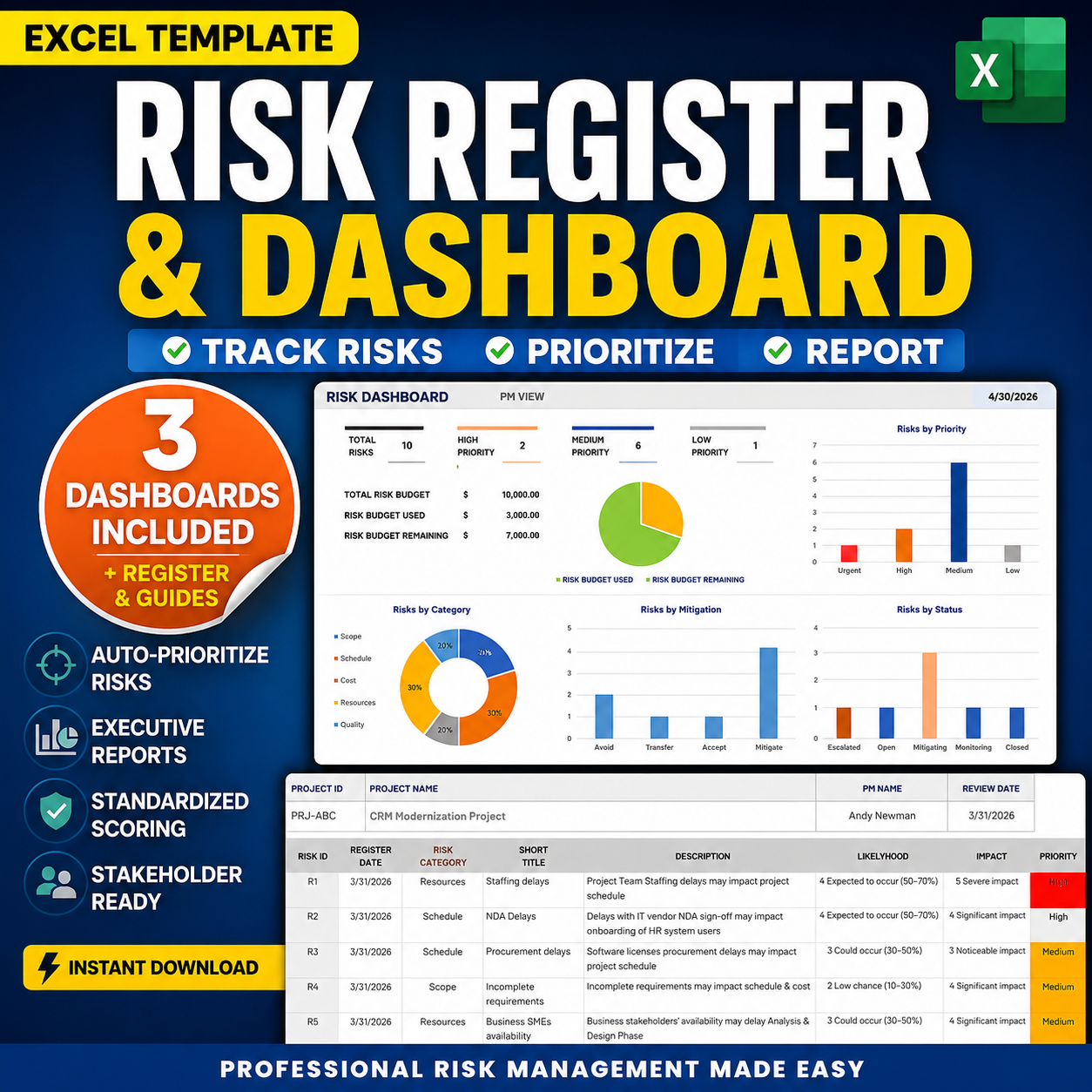
This risk register dashboard template helps PMOs, consultants, and project leaders track project risks, probability, impact, exposure, mitigation, ownership, due dates, and status in one structured Excel workbook. It is designed to turn a traditional risk register into an executive-ready risk dashboard so leadership can quickly see priority risks, mitigation progress, overdue reviews, and items requiring escalation.

Risk register dashboard template preview placeholder

See Priority Risks First

A structured Excel risk register and dashboard that helps project teams prioritize high-impact risks, monitor mitigation status, and prepare executive-ready risk updates without rebuilding spreadsheets from scratch.

Sale (regular )

Instant Download Editable Excel Risk Dashboard
What’s Included FAQ

Key Features

  • Excel risk register for tracking probability, impact, exposure, priority, owner, status, and mitigation
  • Executive risk dashboard for PMO reviews, steering committees, and leadership updates
  • Risk scoring structure to help separate priority risks from ordinary tracker noise
  • Mitigation tracking with owner, due date, review date, status, and response notes
  • Pre-populated sample data plus blank risk register structure
  • Clean, executive-ready risk reporting system with no complex setup required

Why it works?

  • This risk register dashboard is designed for practical project risk management — no macros, coding, or advanced Excel setup required. If you are familiar with standard Excel tables and filters, you can quickly update risk owners, probability, impact, mitigation actions, review dates, and status.
  • Pre-populated examples are included to show how project risks can be tracked in a real PMO, consulting, or delivery environment. The dashboard view helps leadership focus on top risks, exposure, overdue reviews, and mitigation progress instead of reading through a raw spreadsheet.

Use Cases

Designed to support project risk visibility — not scattered risk tracking.

  • Project risk reviews — prioritize risks by probability, impact, exposure, and mitigation status
  • PMO risk governance across projects, programs, and client delivery work
  • Steering committee preparation for top risks, escalations, and mitigation updates
  • Mitigation tracking with owners, due dates, response strategy, and follow-up notes

Built for PMOs, Consultants & Risk Reviews

★★★★★

Prioritize high-exposure project risks before steering committee updates.

Executive Risk Review
★★★★★

Track mitigation owners, due dates, status, and review cadence in one workbook.

Mitigation Tracking
★★★★★

Use the dashboard to separate priority risks from low-value spreadsheet noise.

PMO Risk Governance
★★★★★

Show risk exposure, mitigation status, and escalation needs in a leadership-ready format.

Leadership Reporting
★★★★★

Standardize risk tracking across consulting, IT, operations, and project delivery teams.

Delivery Control
★★★★★

Start faster with sample data, blank tracker structure, and fields already organized.

Fast Setup

Immediate Impact

Designed for risk visibility: priority first, mitigation second.

  • Faster risk reviews — probability, impact, exposure, mitigation, and status in one structured view
  • Less spreadsheet rework — reusable format for weekly risk reviews and PMO governance cycles
  • Earlier escalation visibility — high-priority risks stand out before they become delivery issues
  • Clearer accountability — risk owners, due dates, review dates, and mitigation actions are explicit

What Leadership Gets From the Risk View

Risk exposure. Mitigation ownership. Faster decisions.

  • Executive visibility across top project risks and current mitigation status
  • Priority risk focus by probability, impact, exposure, and status
  • Governance consistency across projects, programs, and client work
  • Faster leadership alignment with fewer ad hoc risk spreadsheet reviews
  • Mitigation accountability with owners, dates, review cadence, and notes
  • Escalation readiness for risks that require decision-maker attention

What’s Included

  • Excel workbook for managing project risks and mitigation tracking
  • Executive risk dashboard with summary views for PMO and leadership reviews
  • Risk register fields for probability, impact, exposure, priority, owner, status, due date, and review notes
  • Pre-populated example data plus blank risk register structure
  • Views for risk scoring, top risks, mitigation follow-up, and executive risk reporting
  • Quick Start Guide / usage guidance included
  • Clean, executive-ready project risk management system

Used When

  • Running weekly or monthly project risk reviews
  • Preparing PMO, steering committee, or client-facing risk updates
  • Tracking mitigation owners, due dates, and exposure levels
  • Standardizing risk reporting across projects, portfolios, or consulting engagements

Built using real PMO governance, project-control, and executive reporting patterns from enterprise IT, consulting, engineering, and federal program environments. Explore the Executive RAID Management System, PM Toolkit, and Executive Project Status Report for a complete project governance and executive reporting system. No affiliation or endorsement by third-party organizations is implied.

FAQ

How will I receive the files?

After checkout you’ll receive a confirmation email containing an instant download link to the ZIP package with the Excel risk register dashboard workbook and supplemental materials.

Can I customize risk fields, colors, and sections?

Yes — the workbook is editable in Excel. You can update fields, labels, examples, owners, probability, impact, priority, statuses, mitigation notes, and review dates to match your team or PMO process. You can also contact us for a custom version.

Does this risk register require macros?

No. The template is designed for practical Excel use without macros, VBA, or advanced setup. It is intended to be easy to update, customize, and reuse across project risk reviews.

Why don’t these templates include artwork or business stock images?

Our templates are intentionally designed to support executive decisions and risk visibility, not decoration or visual excitement. Artwork, stock photos, and unrelated business imagery often distract stakeholders from the risk information that actually matters. By keeping visuals clean and focused, executives can scan top risks, exposure, owners, mitigation status, and due dates faster.

Can I use this template for client or internal work?

Yes. Tuplebits templates can be used for internal business use and client-facing deliverables. Redistribution or resale of the template workbook itself is not permitted.

Need a custom version?

Email info@tuplebits.com with your request and timeline.

What is legal terms of service for digital templates?

These Terms of Service ("Terms") govern your access to and use of digital products offered by Tuplebits LLC ("Tuplebits," "we," "us," or "our"), including project management templates, toolkits, and related digital assets (collectively, the "Products"). By purchasing, downloading, or using any Product, you agree to be bound by these Terms. Read Terms of Services

Need executive reporting slides to pair with the risk register dashboard? Check out the Executive PM Reporting Toolkit for status reports, roadmaps, org charts, and agile dashboards — a complete reporting system.

Related Templates