
Built for project managers who need to send a clear weekly project status update without turning every report into a large deck or a long email thread.
Business & Project Management Templates
Weekly Project Status Report Template
Stop rebuilding weekly reports. Create simple, clear weekly project status reports in minutes using a structured one-page PowerPoint format. This template is designed for project managers and teams who need consistent weekly updates for progress, risks, blockers, actions, decisions needed, and next steps — without turning a team report into an executive deck.
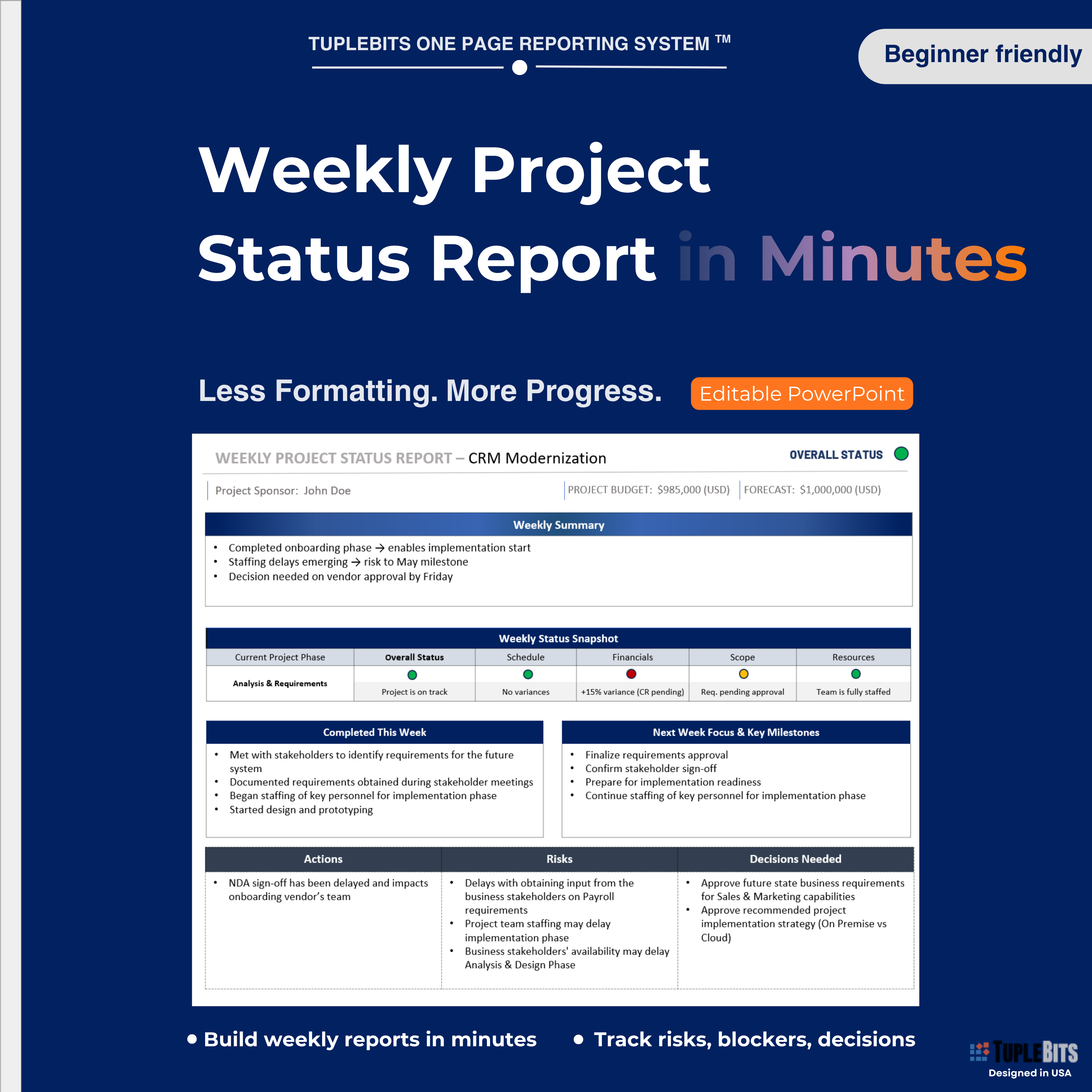
Build weekly team status updates in minutes
A clean weekly project status report format your team can update quickly: what moved forward, what is blocked, what changed, what needs a decision, and what happens next.
Sale (regular )
Instant Download
Editable
PowerPoint
Weekly Status
PDF Guide
This is the lightweight weekly status report option for teams. If you need a leadership-ready version, compare it with the Executive Project Status Report or the full Executive PM Reporting Toolkit .
Key Features
- One-page weekly project status report template for PowerPoint
- Weekly summary section for progress, highlights, and changes
- Status snapshot for clear visibility into where the project stands
- Risks, blockers, and issue callouts for team follow-through
- Actions, next steps, owners, and decisions needed
- Pre-filled example plus clean blank version to adapt immediately.
Why it works?
- Built for weekly team reporting — focuses on practical status information, not board-level narrative.
- Easy to update in PowerPoint — no complex setup, dashboards, macros, or external tools required.
- Progress stays visible — weekly highlights, blockers, risks, and next steps are organized in one place.
- Consistent updates across teams — useful when multiple project managers need the same reporting rhythm.
- Less formatting, more progress — reusable structure helps teams stop rebuilding status reports every week.
- Designed to complement the Tuplebits 1 Page Reporting System™ when a lightweight team status update is enough.
Use Cases
Designed for team communication and weekly project visibility — not executive steering committee reporting.
- Weekly project updates — summarize progress, blockers, and next steps
- Team status meetings — keep discussions focused on what changed this week
- Client or stakeholder check-ins — send a clear one-page update after recurring calls
- Cross-functional delivery tracking — align owners, actions, and decisions needed
- Internal PM reporting — standardize updates across small and mid-size projects
Designed for Teams, Project Managers, and Weekly Delivery Rhythm
Immediate Impact
Designed for weekly delivery visibility: progress first, blockers second.
- Faster weekly updates — reuse the same one-page structure instead of rebuilding reports
- Less status confusion — progress, risks, blockers, actions, and decisions are separated clearly
- Earlier blocker visibility — issues stand out before they become schedule slips
- Cleaner team accountability — next steps, owners, and decisions needed are easy to review
What Teams Get in 60 Seconds
A practical weekly view of status, progress, and what needs attention next.
- Weekly progress — what was completed or moved forward
- Current blockers — what is slowing the team down
- Risks — what could affect scope, schedule, or delivery
- Actions — who owns the next step and when it is due
- Decisions needed — what must be resolved to keep the project moving
What’s Included
- Editable Weekly Project Status Report template for PowerPoint
- Pre-filled example to show how the weekly report should be completed
- Clean blank version for your own project, team, or client update
- Quick Start Guide / usage guidance in PDF format
- ZIP package for instant download
- Simple one-page structure for recurring weekly reporting
Used When
- Preparing a weekly project status update for a team or stakeholder group
- Tracking progress, blockers, actions, and next steps across a project
- Standardizing updates across project managers or delivery teams
- Creating a lightweight project progress report without a complex dashboard
FAQ
How will I receive the files?
After checkout you’ll receive a confirmation email containing an instant download link to the ZIP package with the PowerPoint weekly project status report template and supplemental materials.
Can I customize colors, fonts, labels, and sections?
Yes — the PowerPoint template is editable. You can update labels, text, colors, fonts, section names, status indicators, and weekly content to match your project or team reporting format.
Is this weekly report for teams or executives?
This template is designed primarily for teams, project managers, delivery leads, and stakeholder check-ins. If you need a more executive-ready slide for steering committees, use the Executive Project Status Report template instead.
Is this an Excel tracker or a PowerPoint report?
This product is a PowerPoint weekly project status report template. It is designed for communication and recurring updates, not detailed task tracking or spreadsheet-based project control.
Can I use this template for client or internal work?
Yes. Tuplebits templates can be used for internal business use and client-facing deliverables. Redistribution or resale of the template file itself is not permitted.
Need a custom version?
Email info@tuplebits.com with your request and timeline.
What is legal terms of service for digital templates?
These Terms of Service ("Terms") govern your access to and use of digital products offered by Tuplebits LLC ("Tuplebits," "we," "us," or "our"), including project management templates, toolkits, and related digital assets (collectively, the "Products"). By purchasing, downloading, or using any Product, you agree to be bound by these Terms. Read Terms of Services
Why is this format simple and minimal?
Weekly status reports work best when they are easy to scan and easy to repeat. This template intentionally avoids decorative elements so teams can focus on progress, risks, blockers, actions, decisions needed, and next steps.
Built for weekly team communication and project follow-through. Explore the Executive Project Status Report, Project Budget Status Report, and Executive PM Toolkit if you need more structured reporting for leadership, budget visibility, or full PMO governance.