
The Problem: Most Roadmaps Show Too Much and Explain Too Little
Many project roadmaps fail because they try to show everything. They show every workstream, every organizational group, every dependency, every phase, every activity, and every upcoming deliverable.
At first, that may look comprehensive. In reality, it often creates information overload. Executives have to decode the slide before they can understand the message. They have to ask which milestones matter, which workstreams affect business readiness, which delays are material, and whether the roadmap represents a credible path forward.
That defeats the purpose of an executive roadmap. A roadmap should not force leadership to interpret a detailed schedule. It should communicate the direction of the initiative clearly enough that executives can understand progress, alignment, timing, and areas that may require attention.
The Root Cause: Roadmaps Are Built From the Delivery View, Not the Executive View
Project managers naturally think in terms of delivery execution. They track activities, dependencies, owners, dates, risks, assumptions, actions, issues, decisions, milestones, resource constraints, and phase-level progress. That level of detail is necessary to manage the work.
Executives operate at a different level of information. They need to understand the broader direction of the initiative, how major milestones connect to program objectives, which groups are involved, whether the timeline is credible, and whether executive attention may be needed.
This is where many roadmap presentations break down. The project team builds the roadmap from the internal delivery perspective, but the roadmap is presented to stakeholders who need a leadership perspective.
The result is a mismatch. The project team presents activity. Executives need direction. The project team shows tasks. Executives need milestones. The project team shows dependencies. Executives need to understand impact. The project team shows schedule detail. Executives need timeline confidence.
What Executives Actually Want in a Project Roadmap
Executives do not need every detail on the roadmap. They need the right details.
A useful executive roadmap should show the direction of the initiative over time, the major milestones that define progress, and the business groups or workstreams involved in execution. It should make the overall path visible without overwhelming the audience with the full project schedule.
The best roadmap helps stakeholders understand the story of the initiative: where it starts, how it progresses, what must happen along the way, and what the organization should expect next.
What to Include in an Executive Roadmap
An executive roadmap should include only the information needed to understand direction, progress, and major coordination points. It should not be treated as a place to document every project detail.
Key Milestones Mapped to Program Objectives
Milestones should be mapped to program objectives, not generic organizational objectives. This distinction matters.
A program objective explains what the initiative is trying to achieve. A roadmap milestone shows progress toward that objective. The milestone should help executives understand how the initiative is moving forward.
For example, a milestone such as “System Prototype Is Ready” is useful because it signals progress toward delivery readiness. “End User Rollout Starts” is useful because it signals transition from implementation to business adoption. “CRM Is in Production” is useful because it represents a major program outcome.
Major Workstreams or Business Groups Involved
A roadmap should show which major groups, workstreams, or business capabilities are involved, especially when the initiative requires cross-functional coordination.
This does not mean every department needs its own lane. It means the roadmap should make cross-functional impact visible. If CRM, financial reporting, and compliance are all affected by the initiative, those areas may deserve visibility because they represent meaningful business participation.
The purpose is not to document organizational activity. The purpose is to show which parts of the business are involved in the roadmap and how their work contributes to the overall initiative.
Important Phases Only
Not every phase belongs on an executive roadmap. The roadmap should show phases that matter to leadership because they affect cross-functional coordination, major milestones, business readiness, implementation timing, or multiple business groups.
Internal phases that only matter to the project team may belong in the project plan, not the executive roadmap. The goal is to show how the initiative moves from current state to future state, not to reproduce the project schedule.
Timeline Confidence With Overall Status
Executives need to understand whether the roadmap is credible. That does not require dozens of callouts or detailed variance explanations.
Timeline confidence can often be communicated through a simple overall status indicator using RAG logic: on track, at risk, off track, complete, or not started.
This keeps the roadmap clean. The project manager should review the detailed variances, days of delay, dependency movement, and schedule concerns behind the scenes. The executive roadmap should summarize what those details mean.
Reporting Date or Current Position
A roadmap should show where the initiative stands now. A reporting date marker or current-position indicator gives stakeholders immediate context.
Without a current-position marker, executives may struggle to understand whether the roadmap is looking forward, backward, or showing the entire lifecycle without a clear point of reference.
What Not to Include in an Executive Roadmap
A roadmap becomes weaker when it tries to do the job of too many other project artifacts. Risks, assumptions, actions, detailed dependencies, and task-level schedules all matter, but they do not always belong on the roadmap itself.
Do Not Turn the Roadmap Into a Gantt Chart
A Gantt chart is useful for managing project execution. It shows tasks, durations, dependencies, owners, start dates, end dates, and sequencing. That is valuable for the project manager and delivery team.
An executive roadmap serves a different purpose. It should show the major path forward without overwhelming stakeholders with task-level schedule logic.
Do Not List Every Dependency
Dependencies can be important, but detailed dependency management belongs in the project plan or dependency tracker. An executive roadmap may show major cross-functional sequencing when it affects milestones or business readiness, but it should not list every upstream and downstream dependency.
Do Not Add Risks and Assumptions to the Roadmap
Risks and assumptions are important, but they do not need to be listed directly on the roadmap. Adding them to the roadmap can make the slide too crowded and distract from the timeline story.
Risks and assumptions belong in the Executive Project Proposal, Project Charter, RAID dashboard, or risk register. Those artifacts are better suited for explaining exposure, mitigation, ownership, and decision context.
Do Not Add Action Items to the Roadmap
Actions are also important, but they should not be tracked inside the roadmap. Action items belong in decision-action dashboards, status reports, RAID dashboards, meeting follow-up trackers, or team execution tools.
Once actions are added to the roadmap, the slide starts mixing strategic direction with operational follow-up. That creates confusion and makes the roadmap harder to maintain.
Do Not Show Every Organizational Group as a Swimlane
One of the most common roadmap mistakes is creating too many swimlanes. This happens when the creator tries to map every activity to every organizational group.
At first, this may seem logical. If several departments are involved, it feels natural to create one swimlane for each group. But once the roadmap includes too many swimlanes, executives stop seeing the initiative direction and start seeing a dense operational matrix.
A better approach is to group activity into larger packages, workstreams, capabilities, or broader organizational units. For initiatives involving more than five organizational groups, a single-swimlane or simplified mono-color roadmap may work better. In that format, chevrons or milestone blocks can represent major activities across multiple teams without forcing every department into its own lane.
Common Roadmap Mistakes to Avoid
The best executive roadmaps are selective. They do not show everything the project manager knows. They show what executives need to understand.
Mistake 1: Treating the Roadmap Like a Project Schedule
A roadmap should show direction and major milestones. A project schedule should manage execution. When the roadmap includes too many dates, tasks, and dependencies, the audience has to interpret operational detail instead of focusing on the initiative path.
Mistake 2: Showing Too Many Milestones
Not every milestone is executive-relevant. A milestone belongs on the roadmap when it represents meaningful progress, a major transition, a cross-functional handoff, a decision point, or a program-level outcome.
Mistake 3: Creating Too Many Swimlanes for Organizational Groups
Too many swimlanes increase cognitive load. They make the roadmap look like a spreadsheet or project schedule instead of a leadership artifact.
Use swimlanes when they clarify major workstreams or business areas. Avoid creating separate lanes for every department unless each lane tells a distinct executive story. When more than five organizational groups are involved, consider simplifying the view. A mono-color, single-swimlane layout with chevrons representing major activities can communicate the initiative direction more clearly than a complex multi-lane structure.
Mistake 4: Showing Activities Instead of Outcomes
An executive roadmap should not read like a list of activities. It should show the progression of outcomes.
For example, “conduct workshops” is an activity. “Requirements baseline approved” is a milestone. “Train users” is an activity. “End user rollout starts” is a milestone. “Configure system” is an activity. “System prototype ready” is a milestone.
Mistake 5: Mixing Roadmap Content With Risks, Actions, and Assumptions
Risks, actions, assumptions, issues, and decisions are all important, but they should not all be placed on the roadmap. When everything appears on one slide, nothing stands out. The roadmap loses its purpose and becomes a cluttered governance dashboard.
Mistake 6: Using Too Many Colors and Legends
Colors can help a roadmap, but too many colors create confusion. If every workstream, activity type, status, dependency, team, and milestone uses a different color, the audience has to decode the legend before understanding the roadmap.
Executive roadmaps should use color intentionally. RAG status should communicate health or timeline confidence. Phase colors may help distinguish major work packages. But the design should not compete with the message.
Mistake 7: Hiding Timeline Confidence Behind Detail
Sometimes teams add more detail because they are trying to explain uncertainty. But more detail does not always create more confidence.
If the roadmap is at risk, show that clearly. Use overall status to indicate whether the initiative is on track, at risk, off track, complete, or not started. Then use the appropriate supporting artifact to explain the reason.
Summary: A Roadmap Should Tell the Initiative Story
A strong executive roadmap does not show everything. It shows the direction of the initiative, the major milestones that define progress, the business groups or workstreams involved, and whether the overall timeline remains credible.
The best roadmap tells a simple leadership story: here is where the initiative is going, here are the major phases or workstreams involved, here are the milestones that matter, here is where we are now, here is what comes next, and here is whether the overall roadmap is on track, at risk, off track, complete, or not started.
This is the executive lens. It gives leaders enough information to understand progress and alignment without forcing them to read a detailed project plan. The roadmap should create clarity, not complexity.
Why the Tuplebits Executive Roadmap Template Solves This Problem
The Tuplebits Executive Roadmap Template is designed to solve the problem of overloaded roadmap communication. It gives project managers, PMOs, consultants, and program leaders a clean one-page format for showing initiative direction, major milestones, timeline confidence, and involved business groups without turning the roadmap into a Gantt chart.
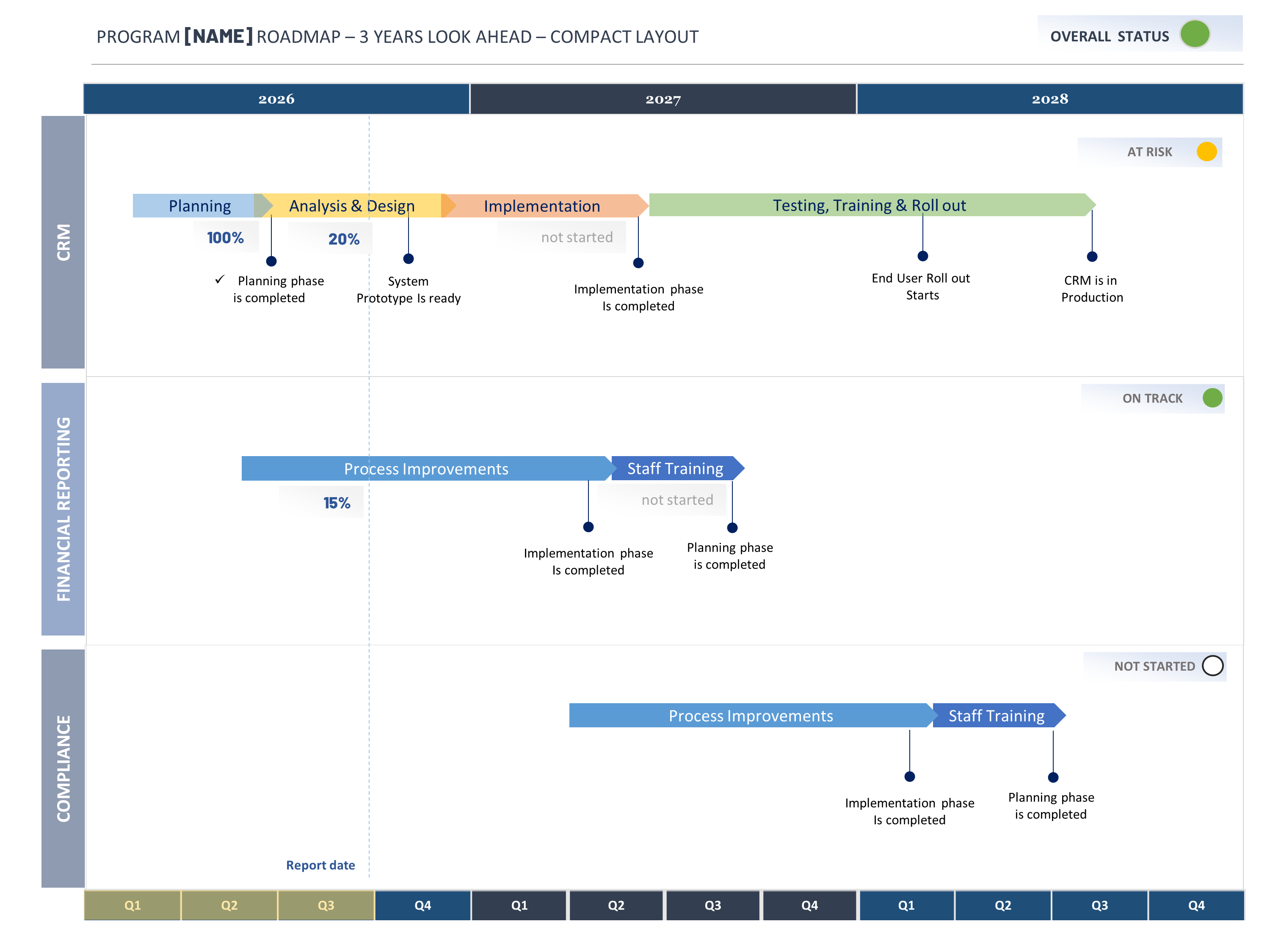
Example: Tuplebits executive roadmap structure with major workstreams, milestone chevrons, timeline sequencing, overall status, and reporting date marker.
The template uses a clear multi-year roadmap structure with visible year and quarter markers, workstream lanes, major milestone chevrons, status indicators, and a report date marker. This gives executive stakeholders a fast view of where the initiative is going and where it stands now.
The roadmap is intentionally focused. It does not try to include every risk, assumption, action item, dependency, or project task. Those details belong in other governance artifacts such as the Executive Project Proposal, Project Charter, RAID dashboard, Actions & Decisions Dashboard, or status report.
Related Templates
If you need a clean executive roadmap, start with the Tuplebits Project Roadmap Template Bundle. It is designed for program roadmaps, timelines, milestone views, and long-range planning.
If you need to explain risks, assumptions, dependencies, scope, benefits, and approval logic, use the Executive Project Proposal Template. If you need to track risks, actions, issues, and decisions, use the RAID Management Toolkit or project status reporting dashboards.
If you need a complete reporting system across status reports, Agile dashboards, roadmaps, budget views, org charts, and meeting reports, use the Executive PM Reporting Toolkit.
Need a Roadmap Leaders Can Understand Quickly?
Download a clean executive roadmap template built for program reviews, milestone planning, cross-functional visibility, and leadership updates.
View Roadmap Template Bundle