
The Problem: Agile KPIs Often Create Executive Confusion
Agile reporting is often designed for delivery teams, not executive stakeholders. That is why many Agile dashboards fail in leadership meetings.
The problem is not that Agile metrics are useless. Burndown charts, velocity, story points, sprint completion, backlog movement, blockers, and capacity indicators can be helpful for Scrum Masters, product owners, engineering leads, and delivery teams. These metrics help teams manage sprint execution, understand flow, and inspect delivery patterns.
The problem starts when those same metrics are placed directly in front of executives without translation.
Many Agile status reports contain too many team-level metrics. They show velocity, committed points, completed points, carryover work, burndown progress, backlog growth, sprint predictability, capacity, defects, blockers, and technical dependencies.
Those metrics may be useful inside the Agile team. But in an executive meeting, they often create confusion.
Executives may not know how the team estimates story points. They may not know whether velocity is calculated consistently. They may not understand why a burndown chart went up instead of down. They may not know whether backlog growth is a problem, a normal discovery pattern, or a sign of scope creep. They may not know whether missed sprint items affect a release, a customer commitment, or only an internal planning target.
The result is a dashboard that looks data-driven but does not clearly answer the executive question: are we delivering meaningful value, and is the initiative still on track?
That is the real purpose of Agile executive reporting.
The Root Cause: Agile Metrics Are Built for Teams, Not Leadership
Agile metrics are often designed to help teams inspect and adapt. They support sprint planning, backlog refinement, daily coordination, capacity planning, delivery forecasting, and retrospective conversations.
Executives operate at a different level of information.
They are not usually managing the sprint. They are managing business outcomes, investment decisions, customer commitments, timeline expectations, organizational readiness, and cross-functional priorities.
This creates a reporting gap.
The team may report that velocity changed from 42 points to 36 points. The executive audience needs to know whether that change affects the release date, scope expectations, business value, budget, or customer delivery commitment.
The team may report that several stories moved to the next sprint. The executive audience needs to know whether the delay is material or simply normal Agile backlog movement.
The team may report that the burndown chart shows remaining work above the ideal line. The executive audience needs to know whether the team is still likely to meet the release objective.
Why Burndown Charts Often Fail in Executive Meetings
Burndown charts are one of the most common Agile reporting tools, but they are often weak executive communication tools.
A burndown chart may show remaining work over time, usually based on hours, tasks, story points, or another team-defined unit of work. The chart may be useful for a delivery team because the team understands the estimation approach, the sprint commitment, the backlog changes, and the tool logic behind the chart.
Executives often do not have that context.
To interpret a burndown chart correctly, the audience may need to understand how the team estimates work, whether scope was added during the sprint, whether stories were split, whether unfinished work carried over, whether the team changed capacity, whether blockers affected progress, and how the reporting tool calculates remaining work.
That is too much hidden logic for an executive status update.
The problem becomes worse when burndown charts are shown without explanation. A chart may look bad even when the team is managing normal sprint variability. Or it may look acceptable while a major release risk is hidden behind incomplete scope, unresolved dependencies, or optimistic estimates.
Executives should not have to decode the chart. They need the conclusion.
A better executive translation is: delivery remains on track for the next release; release confidence is at risk due to an unresolved dependency; scope is increasing faster than sprint capacity; key feature delivery moved to the next sprint but does not affect the release date; or team velocity is stable, but backlog growth may require scope prioritization.
That is the information executives can use.
Why Story Points Do Not Translate Well to Executives
Story points are useful inside Agile teams because they help estimate relative effort, complexity, uncertainty, or size. But story points do not always translate well to executive stakeholders.
Story points are not hours. They are not dollars. They are not business value. They are not a guaranteed measure of productivity. They are also not always comparable across teams.
This creates a common executive reporting problem.
If a report says, “The team completed 47 story points,” an executive may not know whether that is good, bad, average, improving, or material to the business outcome.
Even worse, executives may misinterpret story points as productivity output. They may ask why one team completed more points than another, even though the teams may estimate differently, work in different domains, or handle different levels of technical uncertainty.
For executive reporting, story points should usually be translated into delivery meaning.
Executives do not need the raw Agile math. They need the business interpretation.
Why Velocity Can Be Misleading in Executive Reporting
Velocity is another common Agile KPI that can create confusion when presented without context.
Velocity can help a team understand delivery patterns over time. It may help with forecasting and sprint planning. But velocity is not a simple executive performance metric.
Higher velocity does not automatically mean better performance. Lower velocity does not automatically mean poor performance. Velocity can change because scope changed, technical complexity increased, team capacity shifted, defects emerged, estimates changed, or the team took on more discovery work.
If executives see velocity without interpretation, they may draw the wrong conclusion.
A team could deliver fewer story points but complete a critical business capability. Another team could deliver many points but mostly complete low-impact work. A team could show stable velocity while release risk increases because of dependency issues or unresolved acceptance criteria.
Velocity should not be treated as a standalone leadership metric.
Why Backlog Metrics Need Business Context
Backlog metrics can also be misleading in executive updates.
A growing backlog may mean scope creep. It may also mean discovery is improving, requirements are becoming clearer, or future work is being captured more effectively. A shrinking backlog may mean progress, or it may mean scope was removed without clear stakeholder alignment.
Backlog size alone does not tell the executive story.
The better question is whether backlog movement affects delivery confidence, release scope, customer commitments, business value, or timeline expectations.
The executive update should explain what the backlog movement means. It should not simply display a backlog count and expect leaders to interpret it.
What Executives Actually Need From Agile Reporting
Executives do not need to manage the sprint. They need to understand delivery health.
A useful Agile executive report should answer a few practical questions:
This is a different reporting lens than the team-level Agile dashboard.
The team dashboard may track sprint mechanics. The executive dashboard should communicate delivery confidence, business impact, and leadership attention areas.
What an Executive Agile Report Should Include
A strong executive Agile report should be concise, structured, and focused on meaning. It should not require executives to understand every sprint metric before they can understand the status.
The most useful Agile executive reports typically include the following sections.
Executive Summary
The executive summary should tell the Agile delivery story in plain language. It should explain where the initiative stands, what changed, why it matters, and whether leadership attention is required.
This is where sprint-level information should be translated into executive meaning. If velocity dropped because the team handled production support work, the summary should explain whether the release remains on track. If backlog growth creates scope pressure, the summary should explain whether prioritization or trade-off decisions are needed.
The executive summary should not repeat raw Agile metrics. It should explain what those metrics mean.
Overall Agile Delivery Status
Executives need a quick health view. A simple RAG status can show whether Agile delivery is on track, at risk, off track, complete, or not started.
This status should reflect the actual delivery assessment, not just sprint completion. A team may complete most sprint items and still have release risk. A team may miss some sprint items and still remain on track for the release. The overall status should summarize the bigger picture.
Value Delivered
Executives need to know what value was delivered, not only how many stories were completed.
This section should focus on outcomes, capabilities, customer impact, operational improvements, or business readiness. It should not become a long list of backlog items.
Next Sprint or Next Month Goals
A good Agile executive report should show what is coming next.
This section should not list every backlog item planned for the next sprint. It should identify the few priorities that matter most before the next executive update: release progress, capability completion, stakeholder validation, testing, rollout readiness, dependency resolution, or decision points.
KPI Health With RAG
Agile KPIs can be useful when they are summarized clearly. Instead of placing raw Agile metrics directly on the page, the report should translate them into simple health indicators.
A RAG view can communicate health without forcing executives to interpret every story point, burndown movement, or velocity change.
Release or Roadmap Confidence
Executives care about whether the team is still likely to meet important delivery milestones.
This is where Agile reporting should connect to the roadmap. Sprint progress should be tied to release confidence, milestone timing, or business rollout expectations.
If the team is completing sprint work but the release is still at risk, the executive report should make that visible. If the team missed sprint work but the roadmap remains credible, the report should explain that too.
Top Issues
Issues are items already affecting delivery.
In Agile reporting, a top issue may include a blocked integration, unresolved acceptance criteria, environment instability, production support conflict, critical defect, resource constraint, or dependency that is actively delaying work.
The executive report should not include every blocker from the team board. It should highlight only the issues that materially affect delivery, release confidence, business readiness, or leadership decisions.
Top Risks
Risks are items that could affect delivery if not addressed.
In Agile reporting, risks may include unstable scope, unresolved dependencies, unclear business ownership, limited testing capacity, vendor delays, technical uncertainty, or business readiness gaps.
The executive report should focus on the few risks that could affect the initiative’s outcome. It should not reproduce the full risk register.
Decisions Needed
Decisions should be included only when they are material to executive action.
Not every Agile decision belongs in an executive report. Many decisions can be handled by the product owner, Scrum Master, project manager, delivery lead, or working team.
Executive-level decisions usually involve scope trade-offs, release timing, budget, business priority, resourcing, customer commitments, or cross-functional alignment.
What Not to Put in an Executive Agile Dashboard
A strong executive Agile dashboard is selective. It should not show everything the Agile team tracks.
Avoid including every sprint task, every backlog item, every story point movement, every ceremony summary, every blocker, or every tool-generated Agile chart.
Also avoid presenting Agile jargon without interpretation. Terms such as velocity, burndown, carryover, story points, backlog churn, sprint commitment, and capacity can be useful, but they should be translated into business meaning.
The executive report should not become a screenshot of the Agile tool.
Detailed sprint execution belongs in the team board, backlog tool, sprint report, or delivery review. The executive dashboard should summarize what the Agile data means for delivery confidence, business value, risk, and decisions.
The Better Strategy: Translate Agile Data Into Executive Meaning
The best Agile executive reporting strategy is not to remove Agile metrics. It is to translate them.
Agile data should be analyzed behind the scenes and converted into a leadership-ready message.
This is how Agile reporting becomes useful for executives. The report moves from raw metrics to interpreted meaning.
Common Mistakes in Agile Executive Reporting
Many Agile reports fail because they use the wrong level of detail for the audience.
Mistake 1: Reporting Sprint Activity Instead of Business Progress
Sprint activity is not the same as business progress. A team may complete many tasks, but executives need to know what capability, value, milestone, or business outcome moved forward.
Mistake 2: Treating Story Points Like Executive Performance Metrics
Story points are relative estimates. They should not be presented as simple productivity, value, or performance indicators without interpretation.
Mistake 3: Showing Burndown Charts Without Explaining the Meaning
A burndown chart may be useful to the team, but executives need the conclusion. If the chart affects release confidence, say that clearly. If it does not materially affect the roadmap, do not overemphasize it.
Mistake 4: Confusing Team Health With Initiative Health
A team may be working well while the initiative is still at risk due to scope, dependencies, business readiness, or stakeholder decisions. Executive reporting should reflect initiative health, not only team mechanics.
Mistake 5: Overloading the Dashboard With Tool-Specific Metrics
Different Agile tools calculate and display metrics differently. If executives need to understand the tool logic before understanding the report, the dashboard is too complicated.
Mistake 6: Hiding Risks Behind Agile Terminology
A blocked dependency, unclear scope decision, unstable backlog, or missed release target should be explained plainly. Agile terminology should not hide the real leadership issue.
Summary: Agile Reporting Should Support Executive Decisions
Agile reporting for executives should not be a sprint report with a leadership title.
It should be a translated view of Agile delivery that helps leaders understand whether the initiative is healthy, what value has been delivered, what is coming next, and what could affect business outcomes.
Burndown charts, velocity, story points, backlog movement, and sprint metrics can help teams manage delivery. But they often fail in executive reporting when they are presented without interpretation.
Executives do not need sprint-level math. They need delivery confidence, business impact, clear risks, top issues, and decision context.
The strongest Agile executive updates connect team-level execution to leadership-level meaning.
Why the Tuplebits Agile Executive Dashboard Solves This Problem
The Tuplebits Agile Executive Dashboard is designed to help project managers, Scrum Masters, product owners, consultants, and PMOs translate Agile delivery into an executive-ready status view.
Instead of forcing executives to interpret story points, burndown math, backlog movement, or platform-specific Agile metrics, the template focuses on the information leaders actually need: executive summary, Agile delivery status, value delivered, next goals, KPI health, release confidence, top issues, and top risks.
The template is built for leadership conversations, not sprint ceremonies.
It helps separate team-level Agile execution from executive reporting. The team can still use detailed Agile tools and sprint dashboards to manage delivery, while the executive report provides a clean summary of what the data means.
For teams that need the supporting governance views, the Agile Executive Dashboard Bundle provides a broader reporting set for essential Agile executive reporting needs. It keeps the main dashboard focused while using separate views for issues, risks, actions, and decisions.
This creates a better reporting structure:
That separation reduces cognitive overload and makes Agile reporting more useful in leadership meetings.
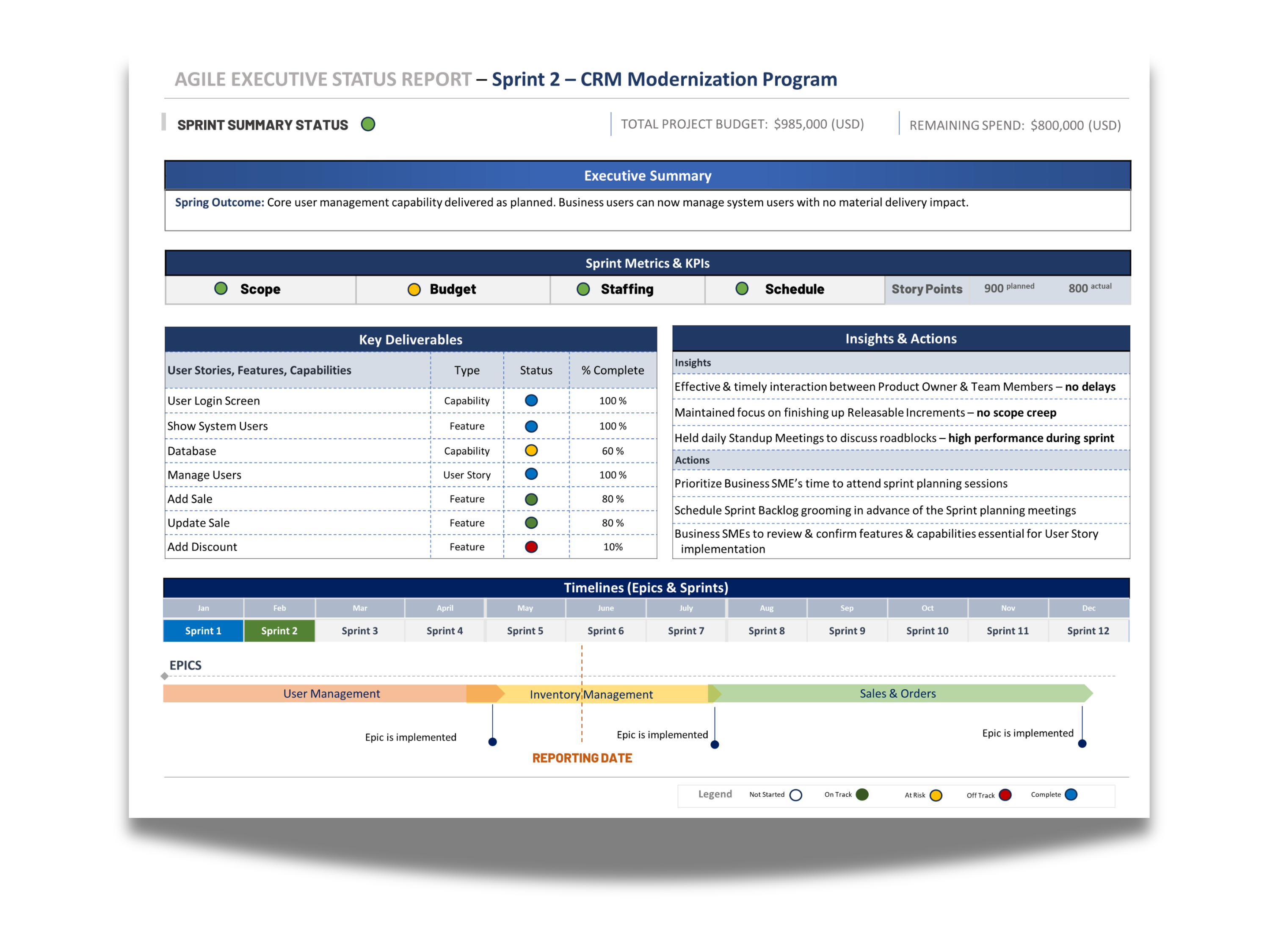
Agile Executive Status Dashboard
One-page Agile leadership view for delivery health, value delivered, next goals, KPI status, release confidence, top issues, and risks.
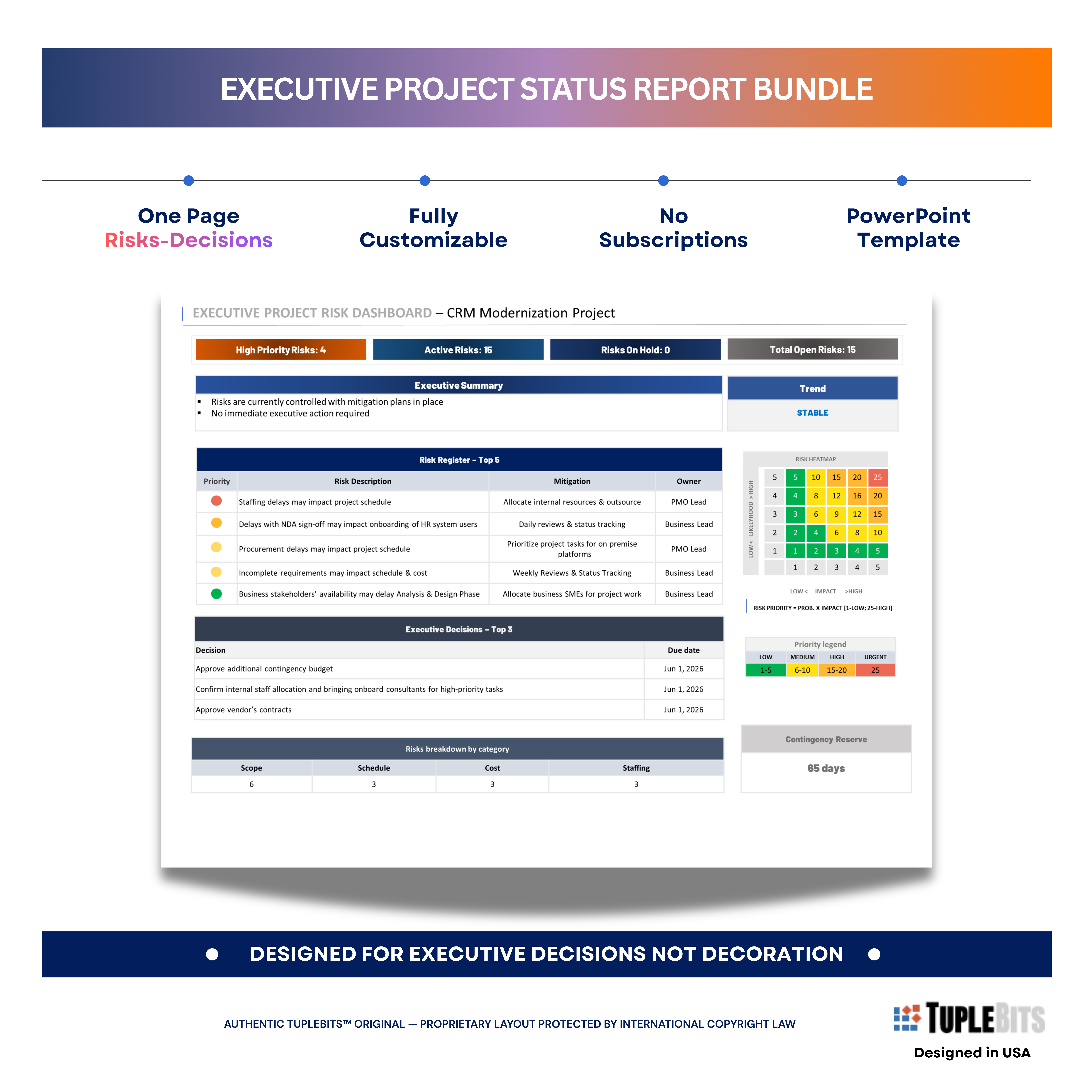
Issues & Risks
Supporting view for current issues and future risks that may affect Agile delivery, release confidence, or business readiness.
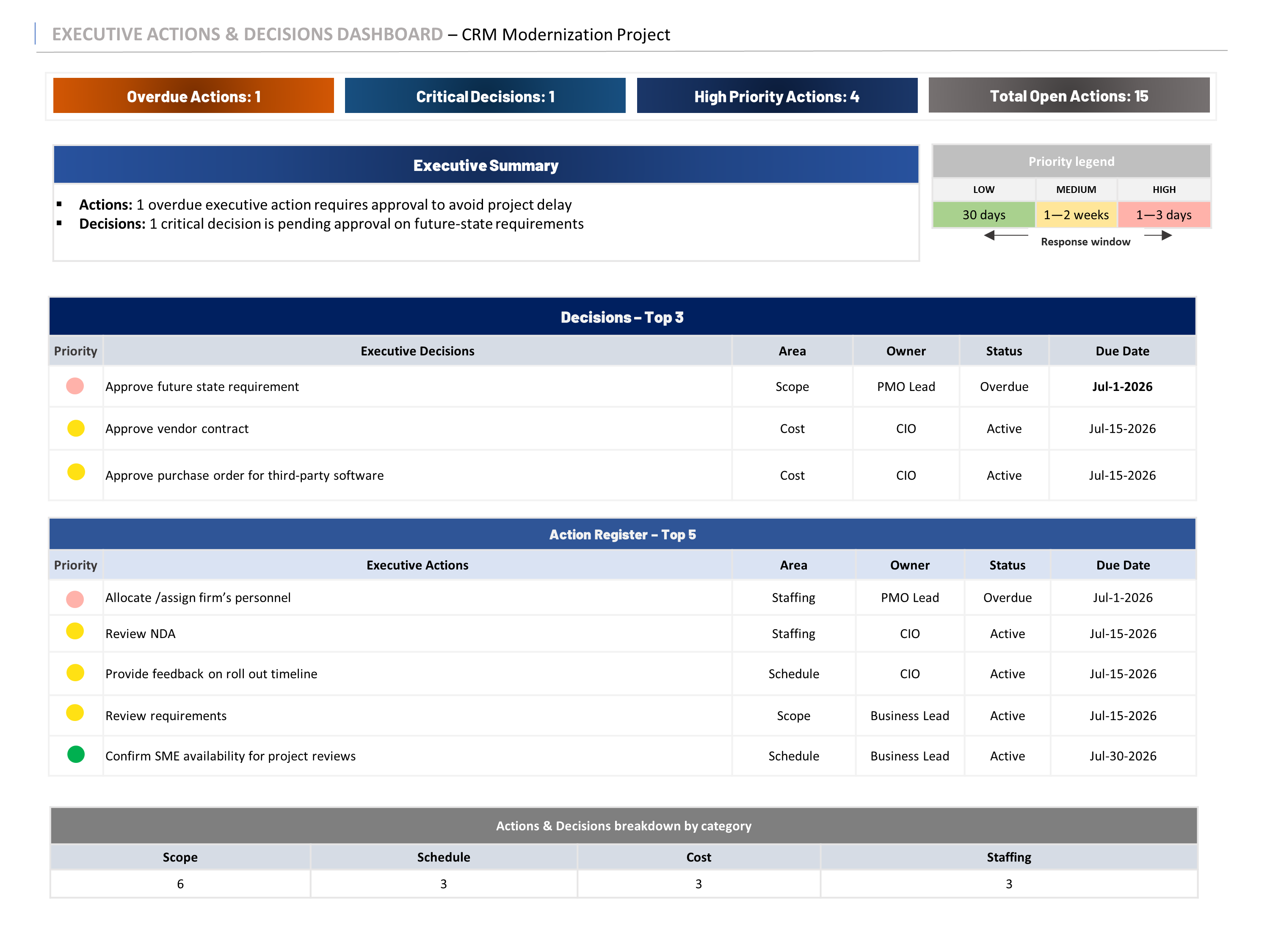
Actions & Decisions
Supporting view for follow-up, ownership, due dates, decisions needed, and executive action tracking.
Example: Agile executive reporting works best when the main dashboard stays focused and supporting views handle issues, risks, actions, and decisions.
Related Templates
If you need a leadership-ready Agile reporting view, start with the Agile Executive Dashboard. It is designed to translate Agile delivery into executive status, value delivered, next goals, KPI health, release confidence, top issues, and top risks.
If you need the broader reporting set, use the Agile Executive Dashboard Bundle to cover the essential supporting views for Agile executive reporting: issues, risks, actions, and decisions.
If you need a broader executive reporting system across status reports, roadmaps, budget views, RAID, org charts, and meeting reports, use the Executive PM Reporting Toolkit — Tuplebits 1 Page Executive Reporting System.
For related guidance, read the PMO dashboard article, the executive project status report guide, and the executive roadmap guide.
Need Agile Reporting Without Sprint-Level Noise?
Download a leadership-ready Agile dashboard built for executive updates, steering committees, PMO reviews, and delivery confidence conversations.
View Agile Executive Dashboard